At a Glance
The CSIR UGC NET June 2026 registration closes today at 11:50 PM. Candidates must act quickly to submit their applications on the official portal, csirnet.nta.nic.in. This guide provides a step-by-step process to complete the application efficiently, including document requirements and common mistakes to avoid, ensuring a smooth submission before the deadline.
Key Takeaways
The main points at a glance
- The CSIR UGC NET June 2026 registration deadline is tonight at 11:50 PM, with no extensions expected.
- Apply only through the official website: csirnet.nta.nic.in.
- Ensure all personal details, educational qualifications, and document uploads are accurate and meet format requirements.
- Complete payment carefully and download the confirmation page immediately after submission.
- Double-check all entries before final submission to avoid errors that could lead to rejection.
- Have your photograph, signature, and relevant certificates ready before starting the application.
Act Now: CSIR UGC NET June 2026 Registration Deadline Approaching
The deadline for the CSIR UGC NET June 2026 registration is rapidly approaching. Candidates must submit their applications by 11:50 PM tonight. No extensions have been announced, so it is crucial to complete your application promptly. This guide provides a step-by-step process to help you finish your application in under 10 minutes if you have all necessary information ready.
CSIR UGC NET June 2026 Registration Deadline: Tonight at 11:50 PM
The National Testing Agency (NTA) has confirmed that the online registration portal for the CSIR UGC NET June 2026 examination will close at 11:50 PM tonight. This deadline has been widely reported by major news outlets, ensuring clarity for all applicants. Do not delay your submission, as website traffic can increase significantly closer to the deadline, potentially causing technical issues such as page timeouts or payment failures.
NTA has not indicated any plans for a deadline extension. While extensions have occurred for other exams in the past due to technical difficulties, it is not guaranteed. Therefore, it is essential to treat 11:50 PM as the absolute final cutoff for submitting your application.
Official Application Portal and Direct Link
The official website for registration is csirnet.nta.nic.in. This is the only legitimate portal for submitting your application. Be wary of third-party websites that may appear similar but are fraudulent. Always verify the URL before entering any personal information.
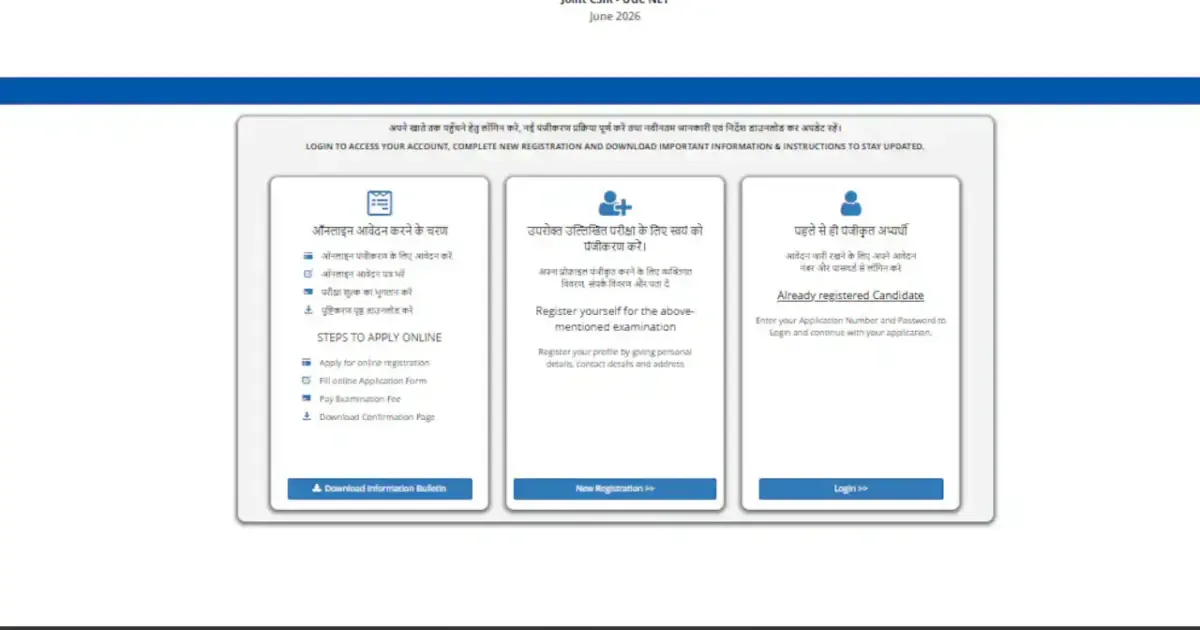
You can typically find a direct link to the registration page in news articles or on the official NTA website. Look for the “Apply Online” button prominently displayed on the homepage. The registration form is standard for all candidates and can be accessed using any modern web browser on a computer or mobile device, provided you have a stable internet connection.
Step-by-Step Application Guide for CSIR UGC NET June 2026
Follow these steps carefully to complete your application efficiently. You can save your progress and resume later if needed.
Step 1: Access the Official Portal
Navigate to csirnet.nta.nic.in and click on the link for “CSIR UGC NET June 2026 Registration” or “Apply Online”.
Step 2: New Registration or Login
New users should click “New Registration” and provide essential details like name, date of birth, mobile number, and email address. You will receive an OTP for verification. Existing users can log in with their application number and password.
Step 3: Provide Personal Details
Fill in your personal information accurately, including your name as per your ID, gender, category, nationality, and disability status if applicable. Ensure there are no typos, especially in your name.
Step 4: Enter Educational Qualifications
Input details of your highest educational qualification, such as the course name, year of passing, university, marks or CGPA, and roll number. Have your mark sheets or degree certificates ready.
Step 5: Select Subject and Exam City
Choose the subject for which you are applying from the dropdown menu. Select your preferred exam city from the available options, with up to three choices possible.
Step 6: Upload Required Documents
Upload your recent photograph, signature, and any necessary category or PwD certificates. Ensure all files meet the specified size and format requirements.
Step 7: Pay the Application Fee
The application fee will be calculated based on your category. Payment can be made via debit card, credit card, net banking, or UPI. Complete the payment process without closing the browser and wait for a confirmation message.
Step 8: Preview and Submit Application
Review all entered details on the preview page to ensure accuracy. Once submitted, changes can only be made during the correction window, if announced. Click “Submit” and then “Confirm” to finalize.
Step 9: Download Confirmation Page
After successful submission, download and save the confirmation page as a PDF. A screenshot is also recommended for your records.
Step 10: Check Email Confirmation
NTA will send an acknowledgment email to your registered address. Verify your application number and check your spam folder if the email is not received.
Documents Required for CSIR UGC NET June 2026 Registration
Before starting the application, ensure you have the following documents scanned and ready:
- Photograph: Recent passport-size photo (10 KB – 200 KB, JPG/JPEG).
- Signature: Scanned signature on white paper with a black pen (4 KB – 30 KB, JPG/JPEG).
- Category Certificate (if applicable): SC/ST/OBC-NCL/EWS certificate (up to 300 KB, JPG/JPEG/PDF).
- PwD Certificate (if applicable): Disability certificate (up to 300 KB, JPG/JPEG/PDF).
- Educational Certificates: Scanned copies of degree or provisional certificates may be needed.
Use online tools to resize images if they exceed the specified limits. This will save time during the application process.
Common Mistakes to Avoid During Application
Prevent your application from being rejected by avoiding these common errors:
Mismatched Name Details
Ensure your name on the application precisely matches your government-issued ID proof and educational certificates. Any discrepancy can cause issues.
Unclear or Incorrect Photograph/Signature
Upload a clear, recent photograph with a plain background and a legible signature. Poor quality uploads are often rejected.
Incorrect Category Selection
Select your category accurately and upload the corresponding certificate. Choosing the wrong category can lead to higher fees or loss of reservation benefits.
Payment Processing Errors
If payment fails, wait before retrying. Verify your bank balance and consider using a different payment method. Contact the NTA helpline if payment is deducted but not confirmed.
Missing OTP or Verification Issues
Ensure you have good mobile network reception to receive OTPs. If you have SMS blocking services, temporarily disable them.
Failure to Submit Final Application
Always complete the process by clicking the final “Submit” button and obtaining the confirmation page. Draft applications are not considered.
Post-Submission Process for CSIR UGC NET June 2026
Upon successful submission and payment, you will receive a unique application number. Keep this number safe for all future communications.
NTA will send a confirmation email. Retain this email as it contains important details about your application. The admit card, containing exam date, time, and center, will be released on the official website a few weeks before the exam.
NTA may open a correction window after the registration period for minor edits. However, critical errors might require contacting NTA support directly. It is best to ensure accuracy during the initial application.
Frequently Asked Questions for Last-Minute Applicants
Can I register after the 11:50 PM deadline?
No, the CSIR UGC NET June 2026 registration portal will close strictly at 11:50 PM tonight. Late applications are not accepted, and you will need to wait for the next examination cycle.
What should I do if the website is slow or unresponsive?
Try refreshing the page or using a different browser or device. A stable Wi-Fi connection is recommended over mobile data. Avoid repeated clicks on submit buttons to prevent duplicate transactions.
How can I retrieve a forgotten password?
On the login page, use the “Forgot Password” option. Enter your application number or registered email to receive instructions for resetting your password.
What is the application fee for CSIR UGC NET June 2026?
The fee varies by category. General candidates typically pay around Rs. 1,000-1,200, OBC-NCL around Rs. 500-600, and SC/ST/PwD candidates around Rs. 250-300. The exact amount is displayed during the payment process.
My payment was deducted, but the status shows unpaid. What is the next step?
Wait for 15-30 minutes for the payment status to update. If it remains unpaid, contact the NTA helpdesk with your transaction details and a screenshot of the payment receipt.
Is it necessary to send a physical copy of documents?
No, the entire application process is online. Documents are uploaded digitally, and physical copies are generally not required unless explicitly requested by NTA.
Final Checklist Before Submitting Your CSIR UGC NET June 2026 Application
Review this checklist before final submission:
- Name matches ID proof and certificates.
- Photograph and signature are clear and within size limits.
- Correct subject and exam cities are selected.
- Required category certificates are uploaded.
- Application fee payment is successful.
- Confirmation page is downloaded and saved.
- Acknowledgment email has been received.
Address any incomplete items before submitting. Ensure you have the confirmation page before closing your browser. Complete these steps carefully to ensure your registration is successful.
Last updated: Based on multiple news alerts published on the final registration day.
Frequently Asked Questions
Can I register after the 11:50 PM deadline?
No, the CSIR UGC NET June 2026 registration portal will close strictly at 11:50 PM tonight. Late applications are not accepted, and you will need to wait for the next examination cycle.
What should I do if the website is slow or unresponsive?
Try refreshing the page or using a different browser or device. A stable Wi-Fi connection is recommended over mobile data. Avoid repeated clicks on submit buttons to prevent duplicate transactions.
How can I retrieve a forgotten password?
On the login page, use the “Forgot Password” option. Enter your application number or registered email to receive instructions for resetting your password.
What is the application fee for CSIR UGC NET June 2026?
The fee varies by category. General candidates typically pay around Rs. 1,000-1,200, OBC-NCL around Rs. 500-600, and SC/ST/PwD candidates around Rs. 250-300. The exact amount is displayed during the payment process.
My payment was deducted, but the status shows unpaid. What is the next step?
Wait for 15-30 minutes for the payment status to update. If it remains unpaid, contact the NTA helpdesk with your transaction details and a screenshot of the payment receipt.
Is it necessary to send a physical copy of documents?
No, the entire application process is online. Documents are uploaded digitally, and physical copies are generally not required unless explicitly requested by NTA.
References
- CSIR UGC NET June 2026 Registration Closes Today At 11:50 PM, Check Direct Link Here – Original report (NDTV India)
- CSIR UGC NET June 2026 Registration Closes Today At 11:50 PM, Check Direct Link Here – NDTV – NDTV provided the core alert with a direct application link.
- CSIR UGC NET December 2025 registration window closing today: Check direct link to apply here – The Times of India – Times of India repeated the same deadline alert with a direct link.
- CSIR UGC NET December 2025: Registration window closes tomorrow at csirnet.nta.nic.in, check direct link – The Times of India – Another Times of India article provided the portal address and a direct link.
- CSIR UGC NET December 2025: Registration window closes tomorrow at csirnet.nta.nic.in, direct link here | Competitive Exams – Hindustan Times – Hindustan Times confirmed the closing date and provided the official website URL.
- CSIR UGC NET December 2025 registration window closing today: Check direct link to apply – The Times of India – Another Times of India piece emphasized the closing today with the direct link.